Look at the browser's real address bar
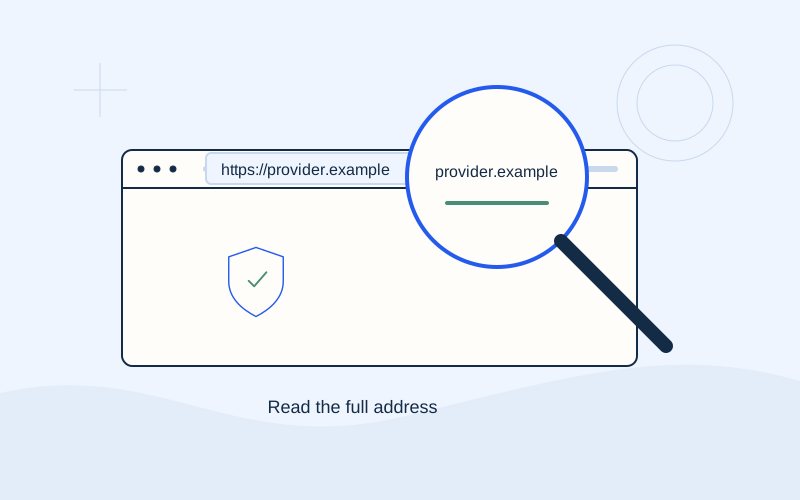
Use the browser's address bar, not an address printed inside the page or on a button. On a phone, tap the bar to display the complete URL. If a page opens inside another app and you cannot clearly see its address, return to your browser and start from a verified address.
Do this before entering information, rather than waiting for the final confirmation screen. That gives you time to compare the name without the pressure of a countdown or an authorisation notification. A page can draw an imitation address box; use the browser controls belonging to your actual app.
Separate the parts of a URL
A simple address such as https://accounts.example.com/help contains the https protocol, the host accounts.example.com and the /help path. In this educational example, example.com is the main domain and accounts is a subdomain. The example.com address is a neutral illustration, not a payment service.
The path after the first slash can contain arbitrary words. A supplier's name in that path does not mean the domain belongs to the supplier. Parameters after a question mark also do not establish the operator's identity. Focus first on the complete host, then compare it with the address you expected.
Watch for similar names
Compare every letter with an address checked independently. Watch for added words, hyphens, changed endings and characters that look alike. An address containing a brand name may have been registered by somebody else. Names that add words such as support or payment need the same careful comparison.
You do not need to prove an unfamiliar address is malicious before deciding to stop. If you cannot confirm that it is the expected channel, reopen the known website or contact your supplier. A familiar colour scheme or grammatically correct message does not settle an address mismatch.
Read subdomains carefully
In billing.example.com, billing comes before example.com. In example.com.other.example, the text example.com forms part of a longer name and does not establish ownership of that host by example.com. These are reading examples, not real services. The useful habit is to inspect the entire name before the first slash.
Domain endings do not all have the same structure; some contain multiple components. Do not treat the final two components as a universal test. Comparing the exact confirmed domain is more useful than trying to guess its ownership from part of the address. Ask for help if the structure is unfamiliar.
Do not confuse HTTPS with company identity
HTTPS indicates an encrypted connection to the displayed domain. It does not mean the website is an official supplier, bank partner or endorsed service. You can still be on the wrong page while the connection is encrypted.
Open the browser's connection information and respect its warnings. Icons vary between browsers and versions. Do not follow a page's instructions to disable browser protection or ignore a certificate warning. If a payment cannot continue without bypassing a warning, pause and ask the verified organisation about an alternative official channel.
Check your starting point and any changes
A text message may display a familiar sender name without proving that its link is genuine. Short links and QR codes may also hide the destination until opened. Prefer opening the official app or typing the confirmed website address yourself.
An official payment process may move you to another environment described by the supplier. If the domain changes, compare that change with official instructions. Do not assume every redirect is acceptable because the first page was correct. Where the expected destination is unclear, ask the supplier rather than trying to identify a processor by its logo alone.
Keep a verified bookmark
After verifying a website, bookmark its homepage or known sign-in point. Avoid saving addresses that contain temporary codes, personal parameters or details of a transaction. When a supplier changes its name or service, check its announcement before updating the bookmark.
A bookmark reduces the need to repeat a search, but you should still review the final domain and what the screen shows. Your browser cannot confirm that the amount or customer account you selected is correct. A verified address is one part of your payment checks, alongside the bill and the instruction you intend to approve.
If you already entered information
If you realise a page is suspicious after entering banking details or private codes, contact your bank immediately through a verified channel. Do not wait for a response from that page. Preserve the address and relevant messages if you can do so without sharing more information. EPOS Electro provides guidance and cannot cancel a transaction or secure a bank account on your behalf.
Frequently asked questions
Is the supplier's name somewhere in a URL enough?+
No. It could be in a subdomain, path or parameter belonging to another website. Compare the exact domain against the supplier's verified address.
Why does my browser not show a padlock?+
Browsers use different icons. Open the connection information beside the address and consult your browser's help. Checking the domain remains essential.
Sources and further reading
Google Chrome Help — Check a site's connectionMozilla — Connection securityENISA — Phishing glossaryExternal links. Checked: 06.10.2026.Found something that needs correcting? Write to [email protected].
EPOS Electro is an independent informational website operated by ActivePhones. We provide general information about electricity bills and common payment methods in Greece. EPOS Electro does not process payments and is not an electricity supplier, bank or government authority.